继上一篇关于如何搭建个人静态网站的文章后,这次给各位带来新的技术分享内容,也就是个人网站插入数学公式与主题冲突的解决方案。
首先,关于如何在个人网页中加入数学公式渲染的功能,Hugo官方已经把这个问题解释的十分清楚了。在这里可以看到他们的回答。由于官方的描述非常详尽,且涵盖了不同config文件类型的代码,我就不重复他们所指示的步骤(但如果需要我用中文进行描述,那我会再回来把那些步骤给分享过来的)直接跳转到我的个人排错。
我遇到的问题主要是因为我已经为自己安装了PaperMod的主题,且我的Config中并没有以官方所使用的"goldmark"作为我的render,导致我使用该技术的时候出现了断层。如果你也遇到了这样的问题,不妨试试和我一样解决。
首先,官方教程要求你在layout文件夹中的_default和partials里,分别对baseof.html的header部分进行修改和创建新的math.html文件。但当我这么做的时候,PaperMod出现了不兼容问题。我所收到的报错如下:
Changes not staged for commit:
  (use "git add <file>..." to update what will be committed)
  (use "git restore <file>..." to discard changes in working directory)
  (commit or discard the untracked or modified content in submodules)
        modified:   themes/PaperMod (modified content, untracked content)
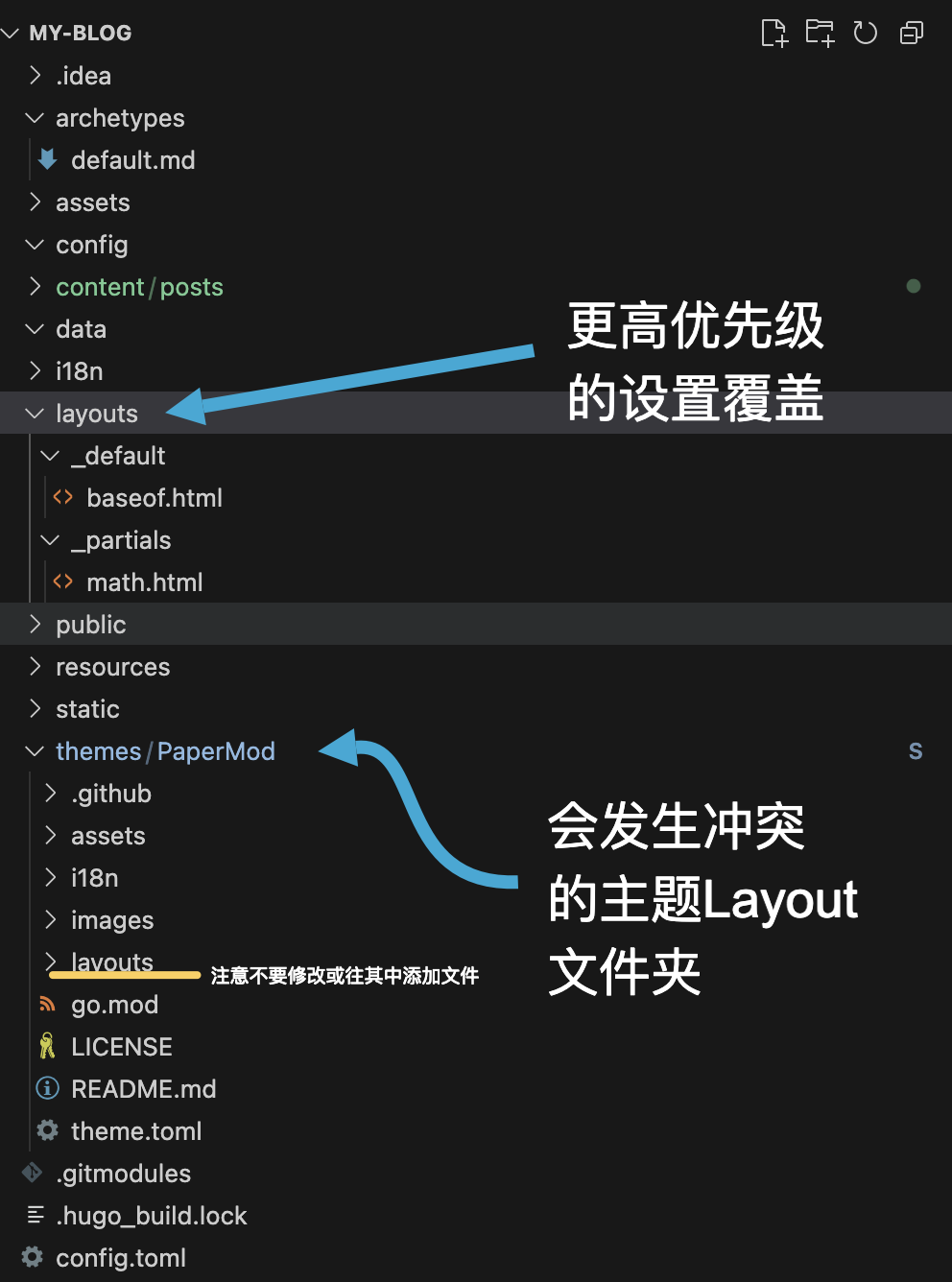
那么该如何解决呢?我们可以在自己的网页项目根目录中找到比theme更上一层的文件夹layouts。这个layout中我们所加入的设置,会以比theme中layout里设置更高优先级的形式,在网页部署和render时被采纳。因此,你所加入的新文件和更改都可以在不破坏PaperMod或者其它你所安装的主题的情况下被加载,也就是override。
确保你的文件夹的结构和下图逻辑一致:
这之后,检查你的config文件。以toml格式为例,我把整个goldmark的设置都加入到了其中以保证我的设置能成功覆盖原设置。下列代码中有批注的地方是你需要格外注意的设置(非toml代码的格式也可以参考类似修改逻辑,只需轻微调整表达方式。Goldmark相关的技术文档请看这里。):
[markup]
  defaultMarkdownHandler = 'goldmark' #在这里确保goldmark为默认markdown渲染器
  [markup.goldmark]
    duplicateResourceFiles = false
    [markup.goldmark.extensions]
      definitionList = true
      linkify = true
      linkifyProtocol = "https"
      strikethrough = true
      table = true
      taskList = true
      [markup.goldmark.extensions.cjk]
        eastAsianLineBreaks = false
        eastAsianLineBreaksStyle = "simple"
        enable = false
        escapedSpace = false
      [markup.goldmark.extensions.extras]
        [markup.goldmark.extensions.extras.delete]
          enable = false
        [markup.goldmark.extensions.extras.insert]
          enable = false
        [markup.goldmark.extensions.extras.mark]
          enable = false
        [markup.goldmark.extensions.extras.subscript]
          enable = false
        [markup.goldmark.extensions.extras.superscript]
          enable = false
      [markup.goldmark.extensions.footnote]
        backlinkHTML = "↩︎"
        enable = true
        enableAutoIDPrefix = false
      [markup.goldmark.extensions.passthrough]
        enable = true
        [markup.goldmark.extensions.passthrough.delimiters]
          block = [['\[', '\]'], ['$$', '$$']] #这是需要你加入的新表达模块
          inline = [['\(', '\)']] #这是需要你加入的新表达模块
      [markup.goldmark.extensions.typographer]
        apostrophe = "’"
        disable = false
        ellipsis = "…"
        emDash = "—"
        enDash = "–"
        leftAngleQuote = "«"
        leftDoubleQuote = "“"
        leftSingleQuote = "‘"
        rightAngleQuote = "»"
        rightDoubleQuote = "”"
        rightSingleQuote = "’"
    [markup.goldmark.parser]
      autoDefinitionTermID = false
      autoHeadingID = true
      autoIDType = "github"
      wrapStandAloneImageWithinParagraph = true
      [markup.goldmark.parser.attribute]
        block = false
        title = true
    [markup.goldmark.renderHooks]
      [markup.goldmark.renderHooks.image]
        useEmbedded = "never"
      [markup.goldmark.renderHooks.link]
        useEmbedded = "never"
    [markup.goldmark.renderer]
      hardWraps = false
      unsafe = true #防止goldmark误认为latex输入有损害,这里我关闭了安全设置。
      xhtml = false


[params]
  math = true #也别忘了添加这个
做完了这些,你应该就可以按规定的语法输入数学公式,并在网页部署时成功被渲染了。如下例:
渲染前:
This is an inline \(a^*=x-b^*\) equation.

These are block equations:

\[a^*=x-b^*\]

\[ a^*=x-b^* \]

\[
a^*=x-b^*
\]

These are also block equations:

$$a^*=x-b^*$$

$$ a^*=x-b^* $$

$$
a^*=x-b^*
$$
渲染后:
This is an inline \(a^*=x-b^*\) equation.
These are block equations:
\[a^*=x-b^*\]\[ a^*=x-b^* \]\[ a^*=x-b^* \]These are also block equations:
$$a^*=x-b^*$$$$ a^*=x-b^* $$$$ a^*=x-b^* $$最后,附上我的顶层layout文件夹中两个html文件的内容,以便各位参考修改。
baseof.html
{{- if lt hugo.Version "0.146.0" }}
{{- errorf "=> hugo v0.146.0 or greater is required for hugo-PaperMod to build " }}
{{- end -}}

<!DOCTYPE html>
<html lang="{{ site.Language }}" dir="{{ .Language.LanguageDirection | default "auto" }}">

<head>
    {{- partial "head.html" . }}

    {{ if .Param "math" }}
      {{ partialCached "math.html" . }}
    {{ end }}

</head>

<body class="
{{- if (or (ne .Kind `page` ) (eq .Layout `archives`) (eq .Layout `search`)) -}}
{{- print "list" -}}
{{- end -}}
{{- if eq site.Params.defaultTheme `dark` -}}
{{- print " dark" }}
{{- end -}}
" id="top">
    {{- partialCached "header.html" . .Page -}}
    <main class="main">
        {{- block "main" . }}{{ end }}
    </main>
    {{ partialCached "footer.html" . .Layout .Kind (.Param "hideFooter") (.Param "ShowCodeCopyButtons") -}}
</body>

</html>
math.html
<script id="MathJax-script" async src="https://cdn.jsdelivr.net/npm/mathjax@4/tex-mml-chtml.js"></script>

<script>
  MathJax = {
    tex: {
      displayMath: [['\\[', '\\]'], ['$$', '$$']],  // block
      inlineMath: [['\\(', '\\)']]                  // inline
    },
    loader:{
      load: ['ui/safe']
    },
  };
</script>
以上就是本文的所有内容,愿其对你有所帮助!
MISC:
下面这行表达会让网页渲染出错。核心原因推测是不能在标题格式混用“**”和mathjax的表达。
#### **(h)$r|\hat{y}$**