1. Product Overview
Product Name: Inserable
Target Platform: macOS
Tech Stack: Swift + SwiftUI
Core Function: Manage image assets for Hugo blogs, auto-rename images, and generate Markdown image-reference text.
Problem It Solves: Chaotic image organization, inconsistent naming, and tedious manual image reference writing in Hugo blogs.
2. Core Concepts
2.1 Hierarchy
Inserable

├── Root Folder 1
│   ├── Session A (Folder A)
│   │   ├── formatA_001.png
│   │   ├── formatA_002.png
│   │   └── ...
│   ├── Session B (Folder B)
│   │   └── ...
│   └── ...
└── Root Folder 2
    ├── Session X (Folder X)
    │   └── ...
    └── ...
2.2 Core Relationships
| Concept | Description |
|---|---|
| Root Folder | User’s Hugo image storage path, e.g. /Users/alex/myblog/static/images/. Up to 2 supported. |
| Session | 1:1 bound to one folder under a root folder. Session name = folder name. |
| Image | Image file inside a Session folder, named under unified rules. |
2.3 Naming Rules
Image naming format: <formatting_1>_<###>.<ext>
<formatting_1>: user-defined naming prefix per Session<###>: 3-digit zero-padded sequence (001,002,003…), ordered by creation time, independently counted per Session<ext>: unified to PNG
Markdown output format:

3. Data Integrity Mechanism
3.1 Mirror Backup
| Item | Description |
|---|---|
| Trigger | Auto-run every 5 minutes |
| Storage | Application Support/Inserable/Mirror/ |
| Retention | Keep latest snapshot only |
| Snapshot Content | Root structure (Session folder names + image filename lists) |
3.2 Integrity Validation
Validation scope:
- Root level: Session folder names + count
- Session level: image filenames + count
Validation timing:
- On app startup
- On each mirror cycle (every 5 minutes)
- When user clicks
IN SYNC
Inconsistency handling (Integrity Error):
When any external modification is detected, mark ERROR and lock affected area. User must pick one action from the popup:
| Option | Behavior |
|---|---|
| Restore from Mirror | Restore disk files to mirror snapshot state (revert external changes). |
| Delete Session | Remove Session; move folder to Trash. |
| Re-sync (Accept Changes) | Use current disk state as source of truth; update metadata and mirror. |
Detailed Re-sync (Accept Changes) logic:
- Scan current Session folder.
- Classify and process:
- Compliant files (match
<formatting_1>_<###>.png): keep and update metadata. - Non-compliant images: force-standardize; treat as newly added images, assign new sequence (
max+1), convert to PNG, rename, setoriginalPathtounknown (re-synced). - Non-image files: prompt user to remove manually or move to Trash.
- Compliant files (match
- Update state: update
nextSequenceNumberand persist immediately. - Snapshot: generate new mirror snapshot and unlock.
3.3 Allowed Exceptions
.DS_Store: auto-ignored.- Same-name content replacement: validate filenames only, not file contents (allows users to edit and save in Preview).
4. Root Folder Management
4.1 Root Folder Requirements
- Maximum 2 root folders.
- Root folder may contain only subfolders or be empty.
- If non-folder files are found (e.g., loose
.png), prompt user to clean up before continuing.
4.2 Root Folder Initialization Flow
User selects folder
↓
Scan folder contents
↓
[Illegal files exist?] -> Yes: prompt cleanup, block flow
↓ No
Create corresponding Session for each subfolder (name = folder name)
↓
Sort Sessions alphabetically
↓
Initialization complete (Sessions in "pending standardization" state)
4.3 Root Folder Switching
- Switching root folder means migrating all Session folders to the new location.
- Existing data (Sessions, mirror) for the old root is cleared and rebuilt.
5. Session Management
5.1 Session Creation Methods
Method A: Click New Session
- Create empty folder under current root, default
newsession<#>. - New item appears in Session list.
- User may rename Session (sync-rename folder).
- Session remains empty until images are dropped.
Method B: Drop a folder onto New Session
- Staging: app reads/stages absolute paths for all images in source folder.
- User input: popup requests
<formatting_1>.- If canceled: abort and clear staged data.
- Copy folder to current root.
- Atomic safety check:
- Verify target files exist and size > 0.
- If verification fails: rollback (remove incomplete copied files), abort, keep source folder.
- Standardize using staged original paths to build metadata.
- Source handling: only after steps 4+5 succeed, move source folder to Trash based on settings.
5.2 Session Standardization Flow
When first dropping images into an empty Session, or creating Session from a folder:
Prompt user for <formatting_1>
↓
[User canceled?] -> Yes: abort, keep Session unchanged
↓ No
Sort all images by creation time
↓
Convert all images to PNG
↓
Rename to: <formatting_1>_001.png, <formatting_1>_002.png, ...
↓
Generate change log (first standardization)
↓
Persist nextSequenceNumber + metadata immediately
↓
Create mirror snapshot
5.3 Session Deletion
- On delete, folder is renamed to
<original_name>_Inserable_conflictthen moved to Trash. - Session record is removed from Inserable.
6. Image Operations
6.1 Add Image
Action: drop images onto selected Session area.
Processing:
- Stage original absolute path.
- Pre-check: if Session is not standardized, trigger standardization first.
- Copy file into Session folder.
- Atomic safety check:
- target file exists and size > 0;
- if fail: rollback + abort + keep original file.
- Standardize:
- convert to PNG,
- assign next available sequence number,
- rename to
<formatting_1>_<###>.png, - write staged original path into metadata.
- Immediate persistence: write updated
nextSequenceNumberto disk immediately. - Source handling: only after success of all above, optionally move source image to Trash.
- Mirror update.
6.2 View Image
- Click image row (outside COPY button) to open image with system
Preview.app.
6.3 Image Format Conversion
Priority: PNG > JPG > WEBP
Rule: all images are standardized to PNG.
7. Output Functions
7.1 Copy Single
Click COPY on an image row to copy that image’s Markdown reference to clipboard.
7.2 Copy All
- After first standardization: output includes Markdown references + Original Path log.
- Subsequent copy-all: concise Markdown reference list only.
7.3 Change Log Backup
- Location:
Application Support/Inserable/past_change_log/ - Filename:
<session_folder>_<dd-mm-yyyy>_change_log_backup.txt - Content: full output from first standardization (with Original Path)
8. Global Settings
| Setting | Type | Description |
|---|---|---|
| Root Folder 1 path | Path picker | First Hugo image root directory |
| Root Folder 2 path | Path picker | Second Hugo image root directory |
| Delete original image | Checkbox | Move source image to Trash after import |
| Delete original folder | Checkbox | Move source folder to Trash after folder import |
| Dark/Light mode | Toggle | UI theme switch |
9. UI Layout
9.1 Main UI Structure
┌─────────────────────────────────────────────────────────────┐
│ ● ● ●                                                       │
├─────────────────────────────────────────────────────────────┤
│  ┌─────────────┐   ┌─────────────────────────────────────┐  │
│  │ ROOT_FOLDER │   │         SESSION NAME                │  │
│  │ (switchable)│   │  ┌─────────────────────────────────┐│  │
│  ├─────────────┤   │  │ COPY │      pic_001.png        │││  │
│  │             │   │  ├─────────────────────────────────┤│  │
│  │ SESSION 1   │   │  │ COPY │      pic_002.png        │││  │
│  │ SESSION 2   │   │  ├─────────────────────────────────┤│  │
│  │ SESSION 3   │   │  │ COPY │      pic_003.png        │││  │
│  │ ...         │   │  │ ...                             ││  │
│  │             │   │  │                          [scroll]│  │
│  │             │   │  └─────────────────────────────────┘│  │
│  │             │   └─────────────────────────────────────┘  │
│  │ ┌─────────┐ │                                            │
│  │ │NEW SESS.│ │                                            │
│  │ └─────────┘ │                                            │
│  └─────────────┘                                            │
├─────────────────────────────────────────────────────────────┤
│ [IN SYNC] [SETTINGS]                        [COPY ALL]      │
└─────────────────────────────────────────────────────────────┘
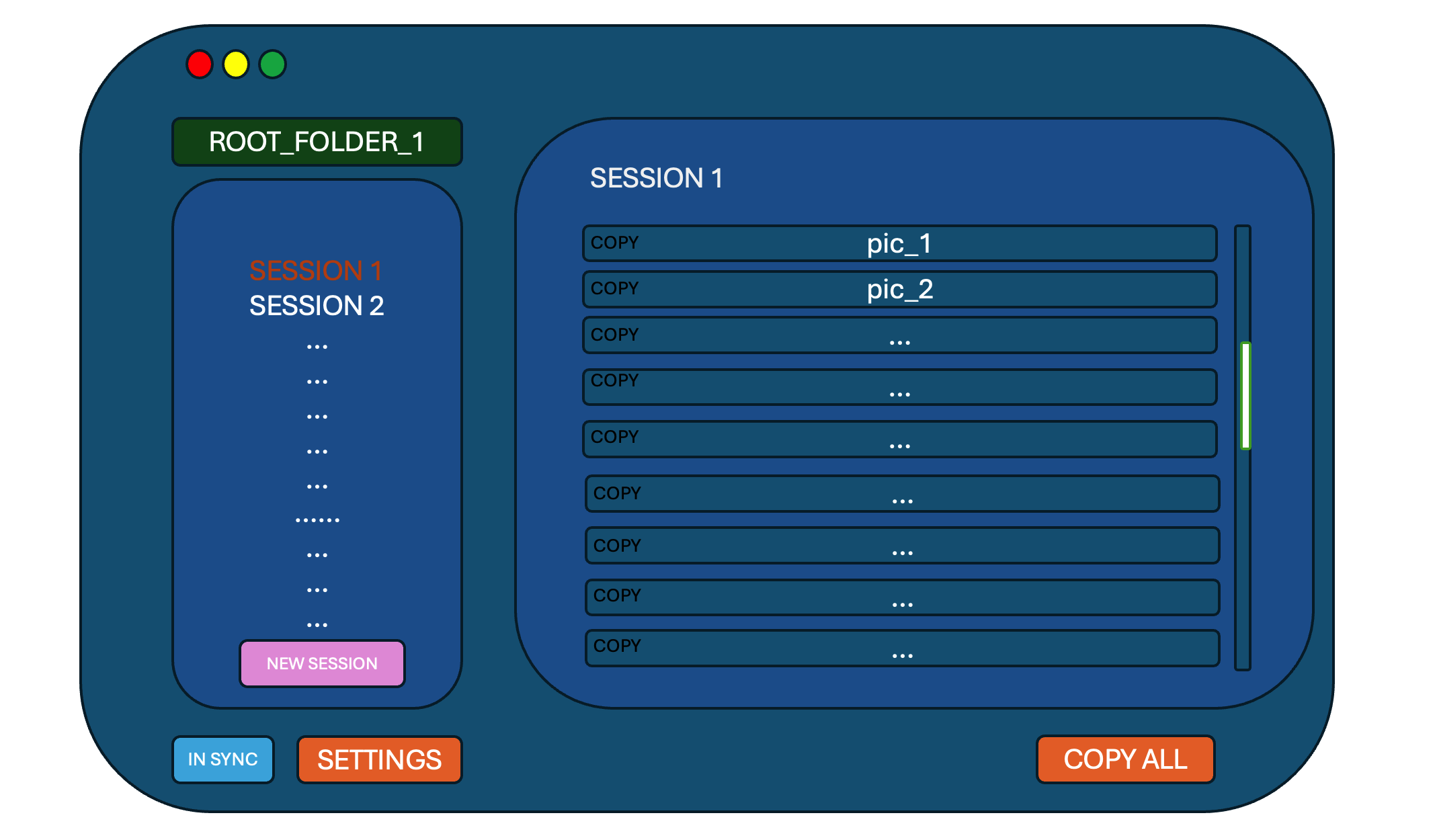
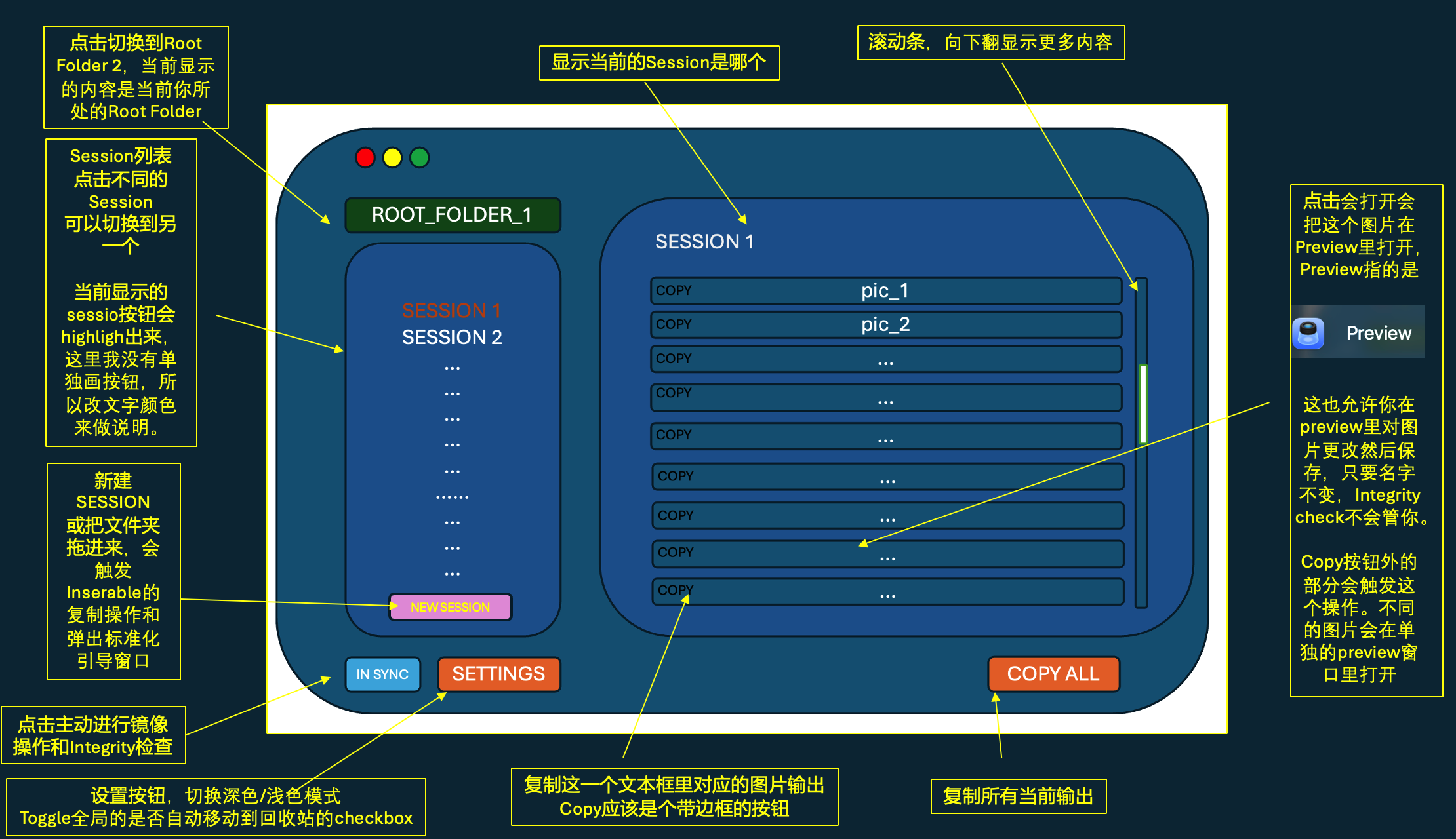
9.2 Status Indicator
| State | Display | Description |
|---|---|---|
| Normal | IN SYNC (green) | Integrity status is healthy |
| Syncing | Spinner icon | Mirror operation running |
| Error | ERROR (red) | Integrity issue detected |
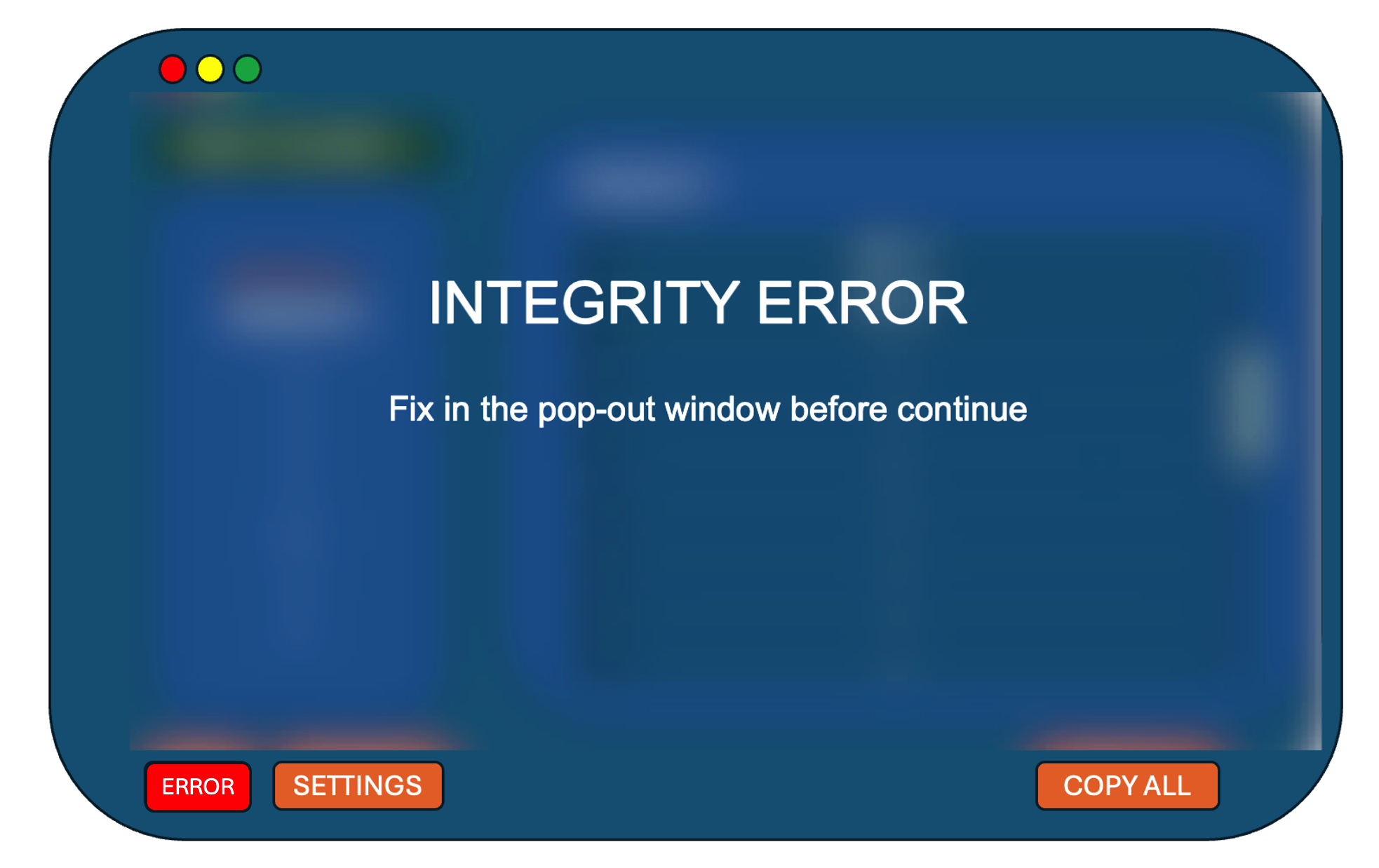
9.3 Integrity Error UI
- Main UI is blurred; “INTEGRITY ERROR” is shown.
- Popup options:
- Restore from Mirror: restore to last synced state.
- Re-sync (Accept Changes): accept current disk state and force-standardize non-compliant files.
- Delete Session: remove this Session.
10. First Launch Flow
Launch Inserable -> check configuration -> if unconfigured, show empty UI -> user clicks Root Folder -> choose folder -> initialize root -> done.
11. Error Handling
11.1 Root Folder Errors
| Error Type | Trigger | Handling |
|---|---|---|
| Illegal file | non-folder file under root | block selection, prompt cleanup |
| Session name conflict | creating Session with existing name | popup for replacement (old folder to Trash) |
| Integrity error | Session folder name/count changed | lock whole root and require repair |
11.2 Session Errors
| Error Type | Trigger | Handling |
|---|---|---|
| Illegal file | non-image file in Session folder | prompt cleanup or move to Trash |
| Integrity error | image filename/count changed | lock this Session and require repair |
12. Data Storage
12.1 Storage Location
~/Library/Application Support/Inserable/
config.json(global settings)sessions/(Session metadata)mirror/(mirror snapshots)past_change_log/(change-log backups)
12.2 Session Metadata Structure
{
  "sessionName": "Banff_Travel",
  "formattingPrefix": "banff_picture",
  "nextSequenceNumber": 5,
  "lastUpdated": "2026-01-14T15:30:00Z",
  "isStandardized": true,
  "files": [
    {
      "currentName": "banff_picture_001.png",
      "originalName": "IMG_1190.jpeg",
      "originalPath": "/Users/alex/Downloads/IMG_1190.jpeg",
      "sequenceNumber": 1,
      "addedAt": "2026-01-14T15:25:00Z"
    }
  ]
}
13. Out of MVP Scope (Future Extensions)
- Support more than 2 root folders
- Session nicknames
- Custom image format / alt text
- Batch rename existing images
- Multi-version mirror history
Recommended Project Structure
To keep implementation aligned with the above design, the following Swift project structure is recommended:
Inserable/
├── App/
│   ├── InserableApp.swift       # entry
│   └── AppDelegate.swift        # lifecycle
├── Model/
│   ├── AppConfig.swift          # global settings model
│   ├── Session.swift            # Session metadata model (Codable)
│   ├── ImageFile.swift          # image file model (Codable)
│   └── IntegrityStatus.swift    # enum: Synced, Syncing, Error
├── ViewModel/
│   ├── RootViewModel.swift      # root management + Session list logic
│   ├── SessionViewModel.swift   # image operations per Session
│   └── SettingsViewModel.swift  # settings-page logic
├── View/
│   ├── MainLayout/
│   │   ├── SidebarView.swift    # Session list on left
│   │   └── ImageListView.swift  # image list on right
│   ├── Components/
│   │   ├── ImageRowView.swift   # single image row component
│   │   └── StatusBadge.swift    # In Sync/Error indicator
│   ├── Overlays/
│   │   ├── IntegrityErrorView.swift # error popup (incl. Re-sync)
│   │   └── NewSessionPopup.swift    # create/standardize popup
│   └── SettingsView.swift
├── Service/
│   ├── FileSystemManager.swift  # core copy/delete/atomic checks
│   ├── ImageProcessor.swift     # format conversion + rename
│   ├── PersistenceManager.swift # JSON read/write (immediate persistence)
│   ├── MirrorManager.swift      # 5-min scheduled mirror
│   └── IntegrityChecker.swift   # comparison logic + Re-sync scan
├── Utils/
│   ├── Extensions.swift         # String/URL/Date extensions
│   ├── Logger.swift             # simple debug logging
│   └── PathHelper.swift         # App Support paths
└── Resources/
    ├── Assets.xcassets
    └── Info.plist
LOG
Project Start
Jan 14, 1:06am
Prototype Completed
Jan 14, 1:28am
Existing Bugs
Mirror restore is broken. It does not restore to target location and can produce ghost folders.
Initial copy output works only in the first standardization/copy of the first Session, with format like:

Original Path:
(/Users/kircerta/Desktop/Inversable_TESTING/MYBLOG_static/images/Apple_Vision_Pro_Article/Body_1.png)
============================================================

Original Path:
(/Users/kircerta/Desktop/Inversable_TESTING/MYBLOG_static/images/Apple_Vision_Pro_Article/Body_2.png)
============================================================

Original Path:
(/Users/kircerta/Desktop/Inversable_TESTING/MYBLOG_static/images/Apple_Vision_Pro_Article/Body_3.png)
At other times, output degrades to:


- New Session creation has serious issues:
- Unexpected rename occurs right after creation (rename should only happen on right-click).
- Folder-drop Session creation has delay or flawed logic.
- Additional issues pending discovery.
Ghost folders appear in Session list even when folder does not exist on disk. No preview opens, but no integrity error is raised either.
No warning on root-folder modification/deletion, even though this operation can rewrite all Session records and should require explicit confirmation.
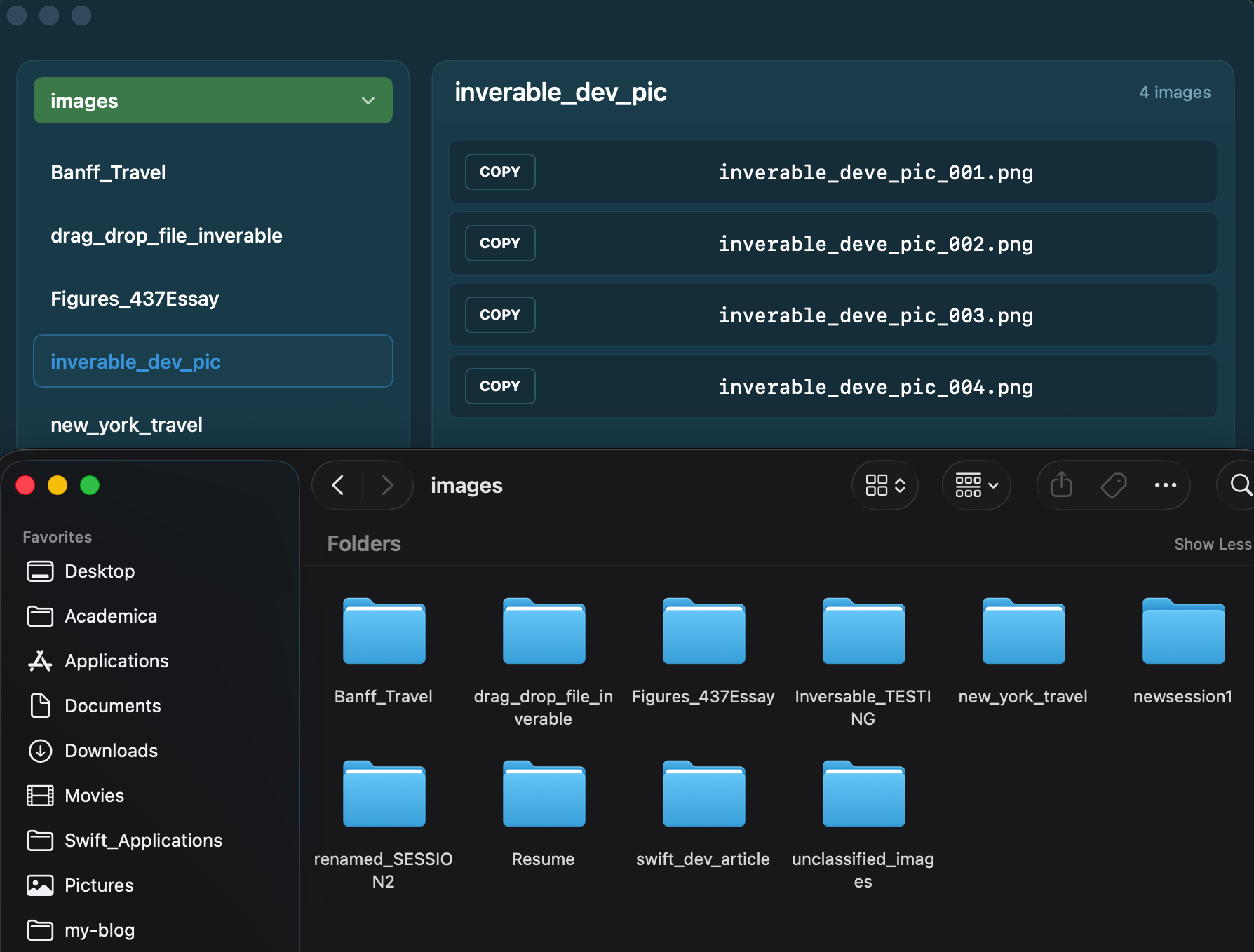
delete original image after importtoggle is ineffective (root cause unknown).
delete original foldertoggle not fully tested, likely also problematic.
- Root Folder switch button is broken; clicking it opens root-folder picker directly. If only one root exists, button should be disabled.
- Root Folder 1 and 2 can currently point to the same path (should not be allowed).
- Root Folder 2 is not actually loaded.
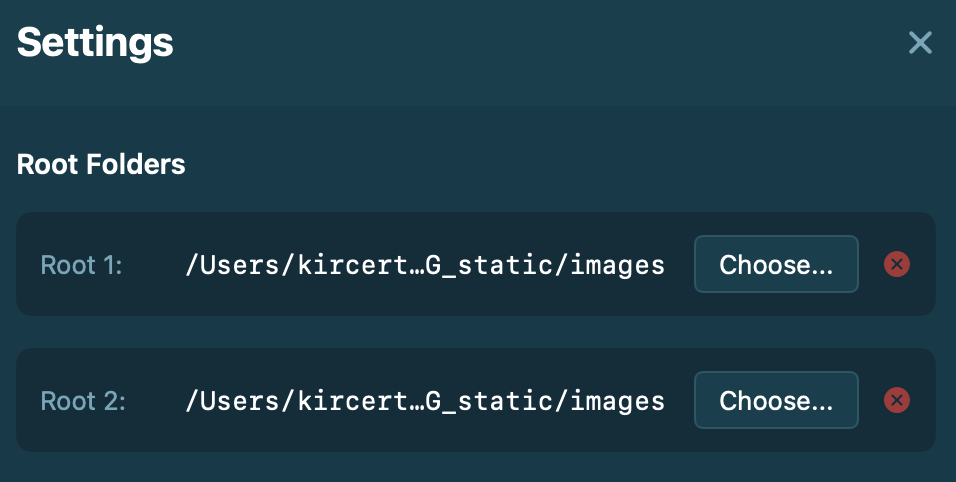
- A Session marked standardized can still be opened directly. After popup closes, right panel is not blurred and does not show expected blocking state with re-activate hint.
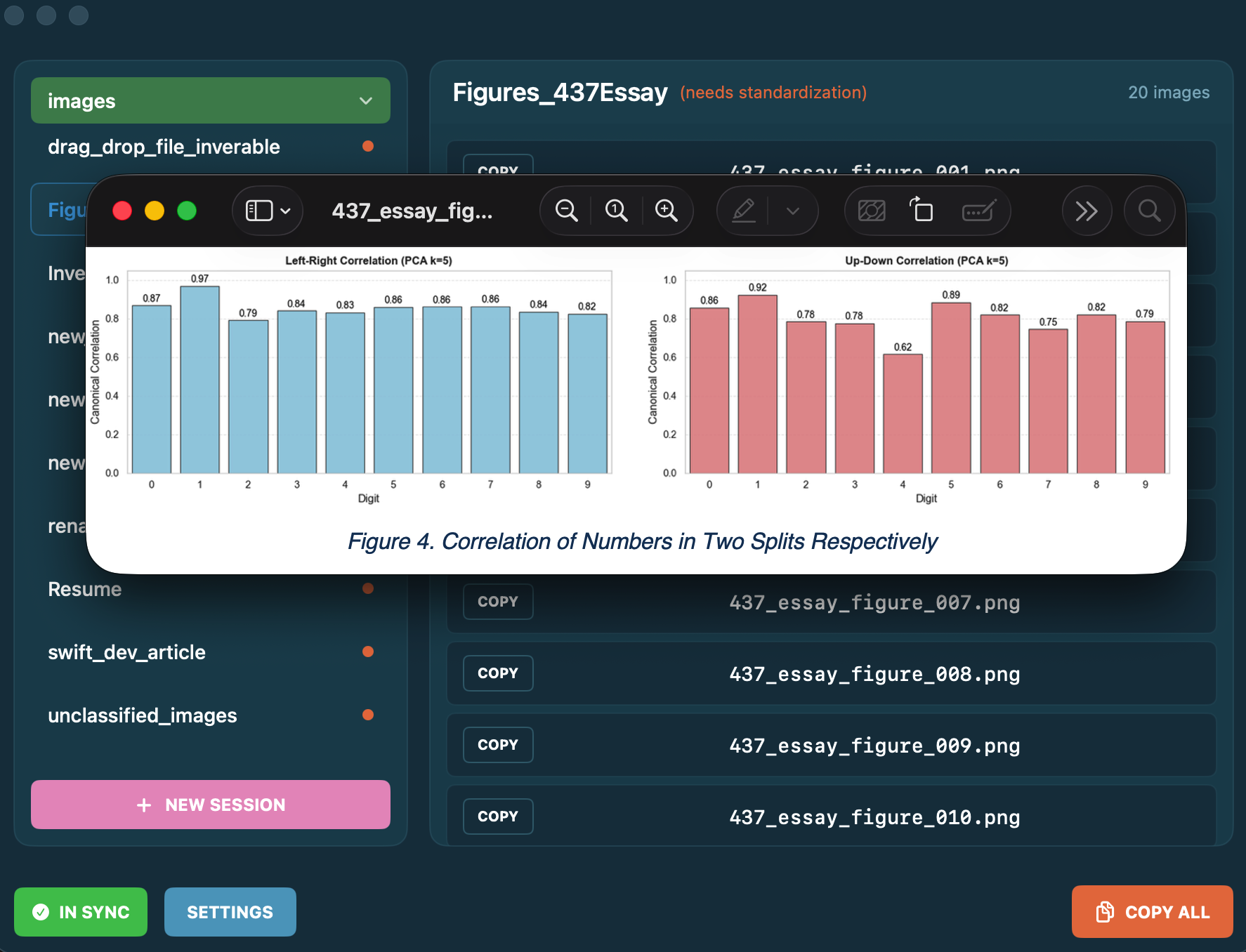
- Session folder rename seems delayed, but final mapping is correct.
Pending Improvements
UI style should move closer to Texmorph design language. Current look feels closer to Flutter than SwiftUI.
Sync button animation glitches whole screen (usable but not expected).
- Investigation suggests sync operation is too fast for current animation pipeline.
- Popup content is partially clipped. It does not block information transfer yet, but needs refinement.
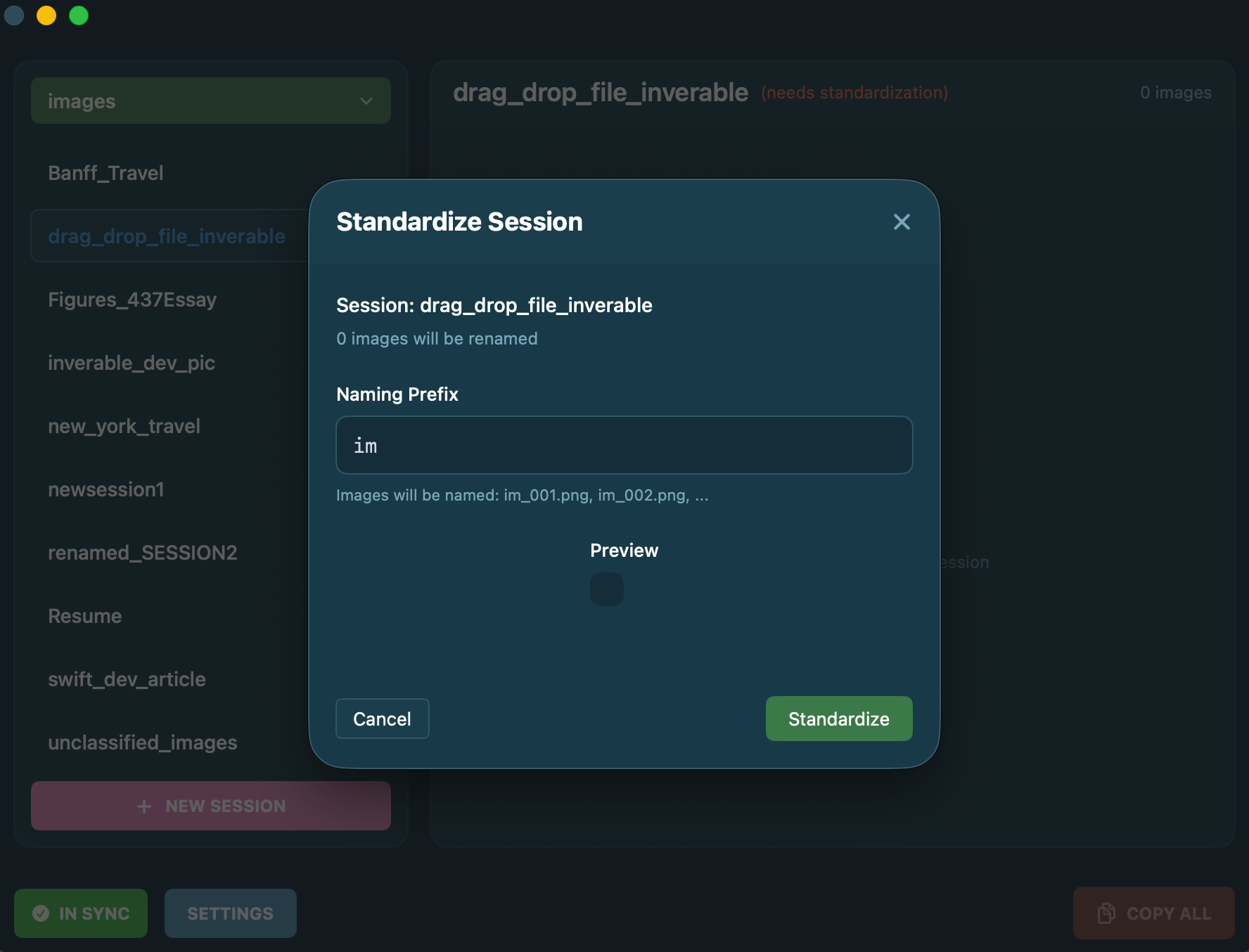
After Session setup, initial settings cannot be modified. Expected behavior: editable + one-click apply + modification log.
Standardize button rendering/display issue.
If Session loses files, current logic requires full Session delete. It works, but there may be a better approach.
Jan 14 Development Summary
Overall UI layout is acceptable; details need polish. Keeping layout while applying Texmorph design language seems promising.
Many hidden bugs are still untested. The above list is only a subset. Still, the fact that the app runs is already encouraging.
[to be continued…]
Jan 16, 1:56am @ Robarts Commons
Inserable Alpha 0.0.2 Development Log & Roadmap Summary: One-Tap Mapping Module
Date: 2026-01-16
Module: One-Tap Mapping Utility
Status: Feature complete / core bugs fixed
1. Dev Log (Today)
Today’s main work was building One-Tap Mapping from scratch and resolving a set of difficult macOS Sandbox + file-system interaction issues.
Fix and Improvement List
A. Core Logic Construction
- Implemented automated organization from “scattered Root Folder” to “Session Folder”.
- Added article-level deduplication: repeated references to same image in one article reuse file instead of generating
img_1.png,img_2.pngduplicates. - Added smart format retention with whitelist:
- keep
jpg/gifunchanged (to avoid animation loss or size inflation), - standardize only
heic/webpand similar formats to PNG.
- keep
B. Permissions & Sandbox Battles
This was today’s critical debugging area.
- Issue: app had read permission only, could not delete source files, causing old-residue + new-redundancy double occupancy.
- Fix 1 (Explicit Authorization): removed auto-prefill folder path in
UtilityView; forced manual folder selection viaNSOpenPanelto obtain valid security-scoped write permission. - Fix 2 (Permission Lock): introduced
startAccessingSecurityScopedResource()in manager layer to hold explicit access lock during operation. - Fix 3 (Output Redirection): moved logs, backups, and unused images into
Downloadsto avoid stricter Desktop permission constraints.
C. Algorithm Robustness
- Fixed URL decoding mismatch bug (
image%202.pngvs localimage 2.png) by decoding before matching. - Switched physical delete (
removeItem) to move-to-trash (trashItem) for Gatekeeper compatibility and safer recovery path.
2. Future Improvements
Feature path is stable, but the following directions are worth next iterations.
Technical Debt & Optimization
- Performance: current traversal is single-threaded; very large roots may block UI. Consider Swift
TaskGroupfor parallel file handling. - Transaction rollback: currently relies on
.bakfiles. Future improvement could use atomic operation transactions with full rollback behavior.
UX/UI Enhancements
- Add “Show Log Folder” button after operation completion to open Finder directly at log location.
- Add ignore list (
.inignore) for files that should not be processed by One-Tap Mapping (e.g., static logo/background assets in root).
3. Documentation Plan
As discussed, we will not hardcode manual content in app. Instead use a lightweight static site + client entry model.
Execution Steps
Content production
- Source: reuse existing
content_zh/posts/Developer/Inverable开发文档.md. - Add today’s One-Tap Mapping operational logic, especially: “manual folder selection is required to grant cleanup permission.”
- Source: reuse existing
Deployment
- Compile with Hugo as static site.
- Deploy to GitHub Pages or personal server.
App integration
- Entry in app menu:
Help -> Inserable Documentation. - Implementation:
- Entry in app menu:
CommandGroup(replacing: .help) {
    Button("文档") {
        NSWorkspace.shared.open(URL(string: "你的网址")!)
    }
}
- Fallback hint
- Keep one-line note under folder picker in
UtilityView: “Please manually click the select button to grant app permission to clean old files.”
- Keep one-line note under folder picker in
4. Closing
Inserable’s One-Tap Mapping module now meets an engineering baseline of zero residue, zero false positives, and full traceability.
Today’s debugging strongly proved: in macOS development, working with Sandbox rules is more effective than fighting them.
Mission accomplished.
(Above summary section was generated by Gemini.)