January 10, 2026 - LMA 0.0.3 Update
If there are still people who can’t install the DMG, then I really have a bone to pick with Apple. For this update log, I asked Gemini to ghostwrite it for me; I’m done writing for now. I’ll add some actual development notes in the future. I’m exhausted—there’s just been too much going on lately. Ah… really, switching from Python to other languages takes some serious getting used to. Now that the DMG has been notarized by Apple, the system should only prompt you that it was downloaded from the internet and shouldn’t outright block you anymore. I stake my reputation on the software’s safety, and I’m hoping Gatekeeper will finally let me off the hook this time.
Also, I only changed the underlying architecture; I didn’t touch the other two files, midi_parser.py and sample_parser.py. These handle my core search logic, but they are still a bit buggy. When I search for the key of “B”, it also pulls flats from other keys into the search results. This was probably an oversight on my part at the time, but I could only use the character “B” to represent a flat symbol, fearing it wouldn’t display properly otherwise. Let’s just make do with it for now. In the future, I’ll find a way to build a custom symbol locally and map an unmistakable string of characters to it, so that the display and search behave normally. But I’m not doing that right now.
We’ll talk about the rest in the future. So tired.
Development Notes by Gemini
[Updated January 2026] Architectural Refactoring, Paying “Protection Fees,” and a Git Scare
It’s been a while since I last wrote about development. During this period, LMA has undergone an almost “tear-down-and-rebuild” level of underlying refactoring. Although it still looks like the familiar black window on the surface, what’s under the “hood” has completely changed.
- Saying Goodbye to JSON and Embracing SQLite In earlier versions, to save trouble, I used JSON files to store index data. For a few hundred samples, this was fine. But when my sample library swelled to tens of thousands of files, JSON read/write speeds were simply abysmal, causing noticeable lag every time I launched the app or searched.
So, in this v0.0.3 update, I made a decision that went against my “lazy instincts”: switching entirely to SQLite.
Today’s LMA is no longer a simple text reader; it has a built-in micro relational database. Paired with PyQt6’s multi-threaded (QThread) scanning, the current experience is completely different: tens of thousands of files are indexed into the database instantly, search responses are millisecond-fast, and the interface no longer freezes while scanning files. This is what modern software should feel like.
At the same time, I upgraded from PyQt5 to PyQt6, removed the PyGame dependency, and utilized PyQt’s native QtMultimedia to call the system’s audio engine. This means the software has a smaller footprint, better compatibility, and you no longer have to worry about PyGame acting up on certain systems.
- I Finally Paid Apple’s “Protection Fee” Remember when I complained about macOS’s Gatekeeper in my last post? That “The file is damaged, please move it to the Trash” prompt is an absolute nightmare for indie developers.
To solve this problem, and to spare everyone from having to type xattr -cr in the terminal when installing, I finally compromised—I joined the Apple Developer Program.
Yes, I paid that $99 “protection fee.” LMA v0.0.3 now features an official Developer ID signature. The packaging process has also evolved from simple ZIPs to proper DMG encapsulation. Now, you can elegantly drag LMA into the Applications folder just like installing any genuine software, and Gatekeeper will never lock you out again. My wallet hurts a bit, but the smooth installation experience was worth it.
- Git Scare: The Fear of Being Dominated by .venv During this development cycle, I also made an incredibly classic “rookie mistake” that is worth recording for a good laugh.
When configuring the Python virtual environment, I carelessly forgot to update my .gitignore. As a result, Git uploaded all thousands of my local library files (venv) to GitHub as source code. When I tried to delete them, I got stuck in an endless loop of Everything up-to-date and Merge Conflict.
Looking at the bloated .venv-stable folder in the cloud repository pushed my blood pressure as high as my CPU temperature. Fortunately, I finally issued an “eviction notice” via git rm -r --cached, stripping this garbage from the index while retaining the local environment. A Force Push finally overwrote the erroneous cloud history.
This serves as a stark reminder to myself (and everyone else): writing your .gitignore before writing your first line of code is genuinely important.
- The Future The current Python version (v0.0.3) is already very stable and highly usable. But as I’ve mentioned before, Python always has a performance ceiling when it comes to GUI development. In the coming days, I will slow down updates for this version and channel my energy into learning Swift and SwiftUI.
The ultimate form of LMA should be a purely native macOS application. Until then, I hope this “over-powered” Python version of LMA accompanies you through many enjoyable creative sessions.
(Note: This update was organized and polished by my AI Copilot, Gemini, which witnessed my complete mental breakdown while fixing bugs.)
October 21, 2025 - The First Development Talk
Back in August, I had the idea of building a local sample manager. I wrote a prototype back then, but it felt far too crude. Today, I finished a much more usable version and open-sourced it on GitHub. The project is written in Python, and usage instructions are available on the project page.
To download LMA, please proceed here. Google Drive is simply more convenient, even though it looks very informal. Since I need to wait for more friends to test the software and provide feedback, I’m hosting it on Google Drive for now. Once LMA is more polished, I will consider publishing an official Release on GitHub. Of course, friends who can read this page should have no trouble accessing Google Drive. I won’t create a separate Baidu Netdisk download link (though you are welcome to distribute and share the software as you please, provided you comply with relevant laws and regulations).
Regarding the motivation behind this project: many producers (myself included) own far more samples than we can realistically browse. One reason is that many mainstream DAWs still lack an intuitive sample-management workflow. Online sample libraries usually offer much better search functions than built-in DAW browsers, but they are paid services and cannot manage your local collection. Existing local sample managers are either riddled with ads or priced around $99. So, I decided to build a handy tool for myself.
The project is currently named LMA. This version supports drag-and-drop operations, loop/one-shot filtering, and keyword search. I deliberately designed the interaction logic to closely mimic familiar online sample libraries (without crossing any legal lines) so users can pick it up immediately. I also wrote a usage guide on the GitHub page. I haven’t encountered any critical bugs in my own testing, but if you find any, please report them and I will fix them. The next version will feature richer tagging options and an optimized audio preview workflow.
Below is the user guide.
Installation
Windows users can launch the app directly. The system may throw a security risk warning; just ignore it and run it anyway if you trust the file.
macOS users should open the .dmg and drag the app into the Applications folder. You will likely see an “unverified developer” warning. Go to System Settings -> Privacy & Security, scroll down to find the new prompt, click “Open Anyway,” and enter your admin password to launch LMA. The current DMG might still contain some leftover test lists, so you may see a populated interface upon first launch. Just select your sample folder and ignore it; I will fix this in a future update.
Main Interface
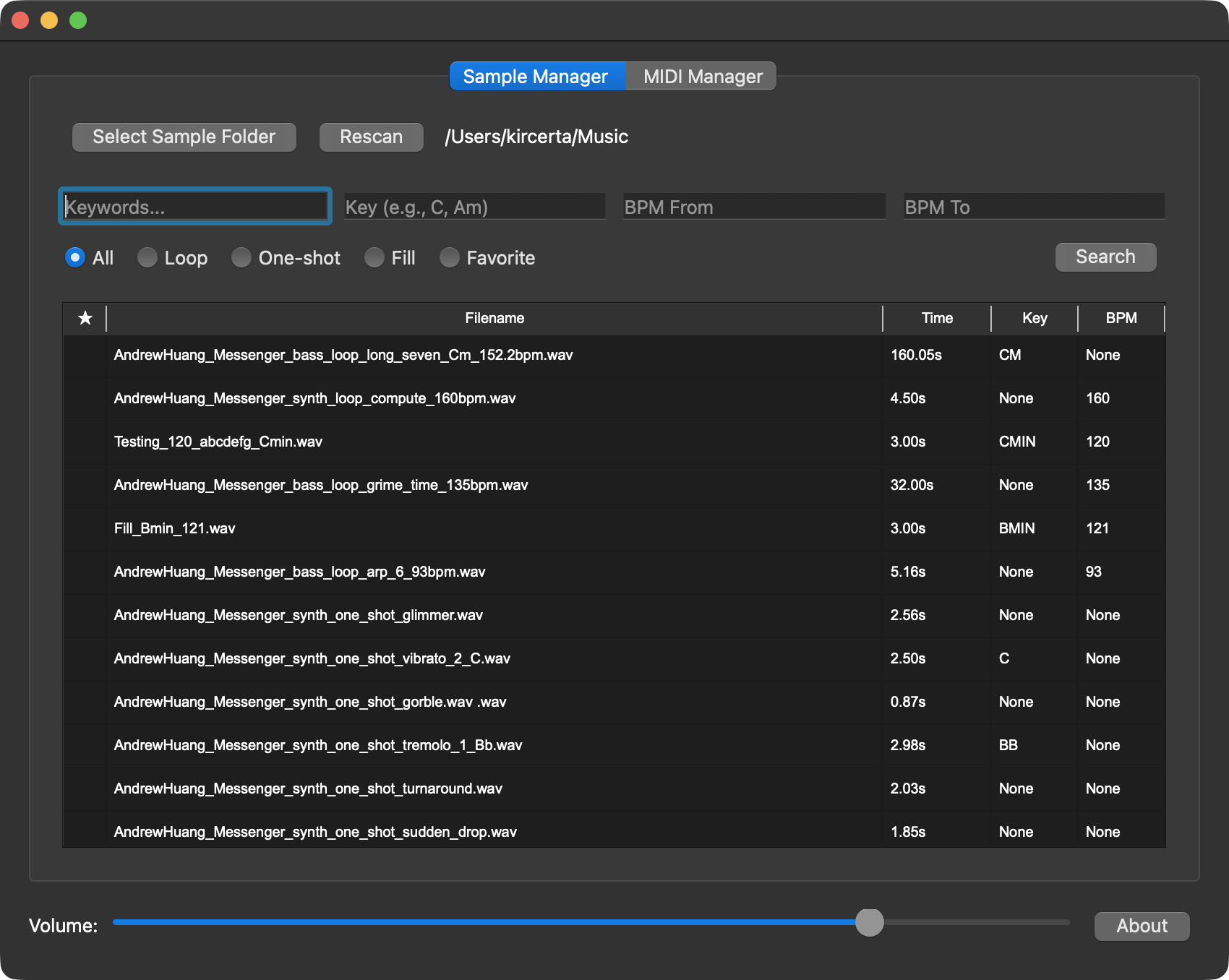
Initialization
- Click
Select Folderand choose the local sample directory you want to index. - Click
Rescanto rescan the samples within the selected folder. - If your sample library is massive, LMA needs time to analyze and read the duration of every file to build the index. If the app appears to freeze right after folder selection, please be patient and do not force quit.
- If the wait time exceeds a reasonable threshold (e.g., 10 minutes), then consider force quitting.


Searching Samples and MIDI

- Enter keywords in
Enter Keywords, then clickSearch.- Click a listed audio sample to preview it; click again to stop playback.
- MIDI files cannot be previewed in-app; drag them into your DAW to audition them.
- After selecting a sample or MIDI file, you can drag and drop it directly into your DAW or another location.
- Dragging creates a copy at the destination (like your desktop or project folder).
- The original source file remains entirely unaffected.
- You can filter by
looporone shot. Selecting either filter executes an immediate search. - You can search for samples within a specific BPM range.
- If the start and end values are identical, LMA will perform an exact BPM match.
- You can search by musical key.
- Please note: LMA’s key detection is based purely on filenames, not audio content analysis. Incorrectly named files will not be recognized automatically and will require manual renaming by the user.
- Due to the complexity of key naming conventions and parser limitations, precise key searches currently require following my specific syntax:
- For major keys, search the note directly (e.g.,
A). This will return major-key matches, though it may include some false positives. - For minor keys, search using the
Amformat (e.g.,Am). - Inputs like
AminorAminorwill cause issues, as I have standardized all variations internally to ensure accurate targeting. - For modes like Lydian or Dorian, enter them in the Keywords field, or search by the root major key and filter manually. See the examples below:
- For major keys, search the note directly (e.g.,
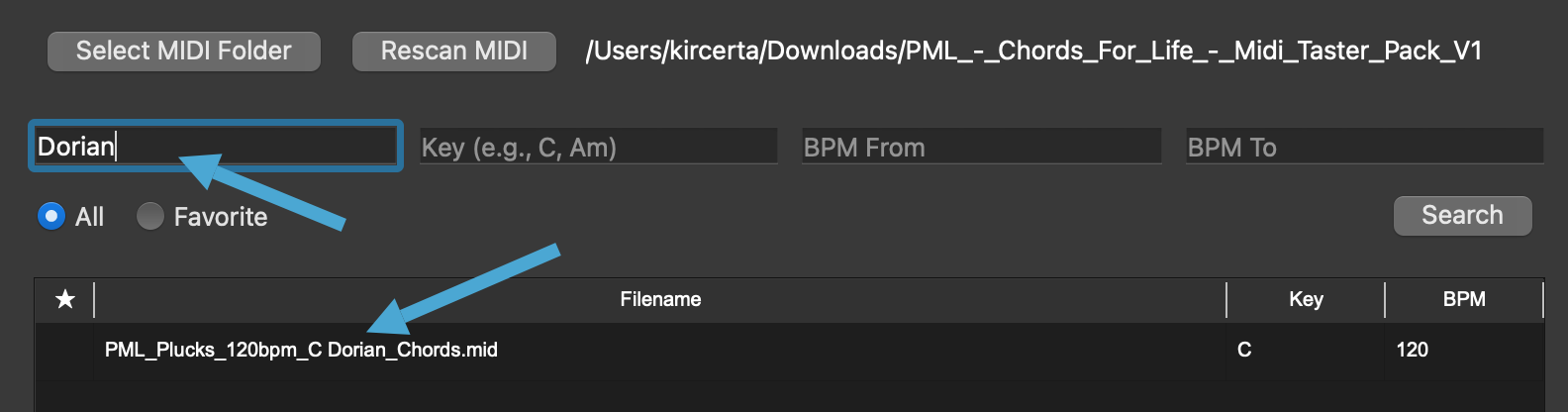
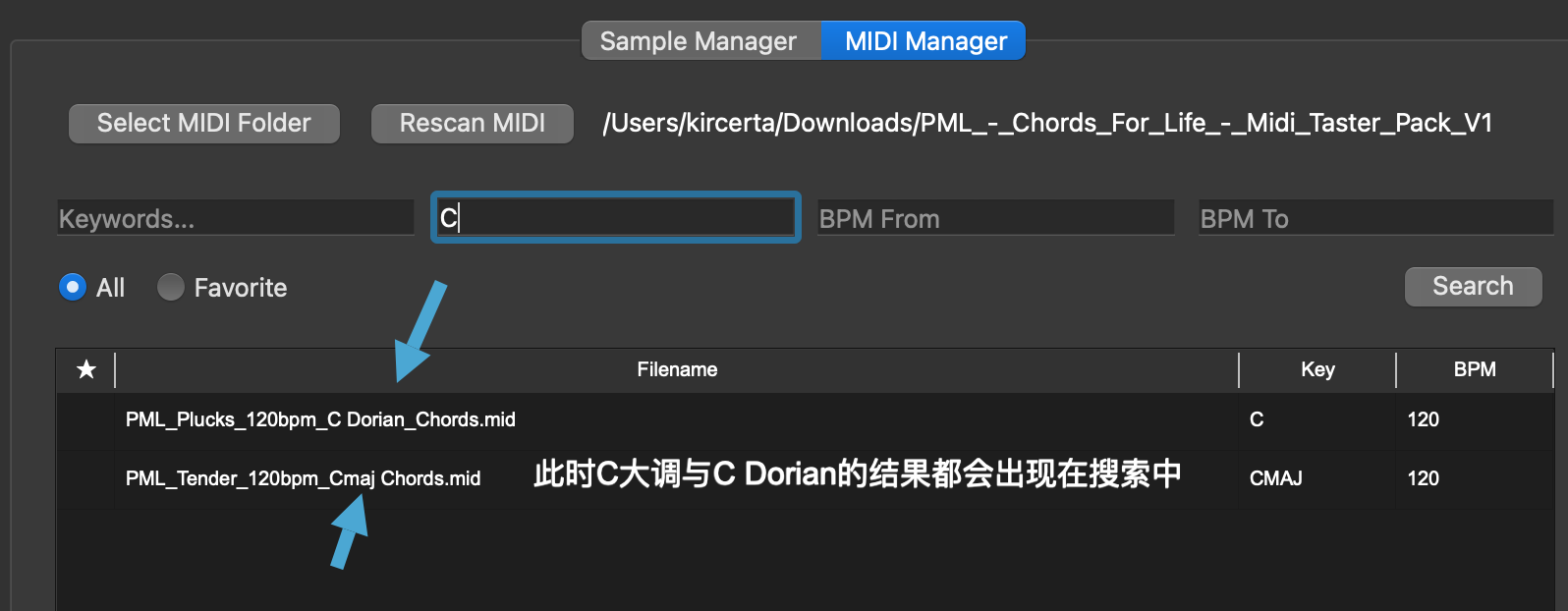
Tags
- Right-click a sample to reveal the
Add to collectionoption.- Once selected, a star icon will appear next to the sample in the list.
- Tagging a sample does not rename or modify the original source file. Rest assured.
Miscellaneous
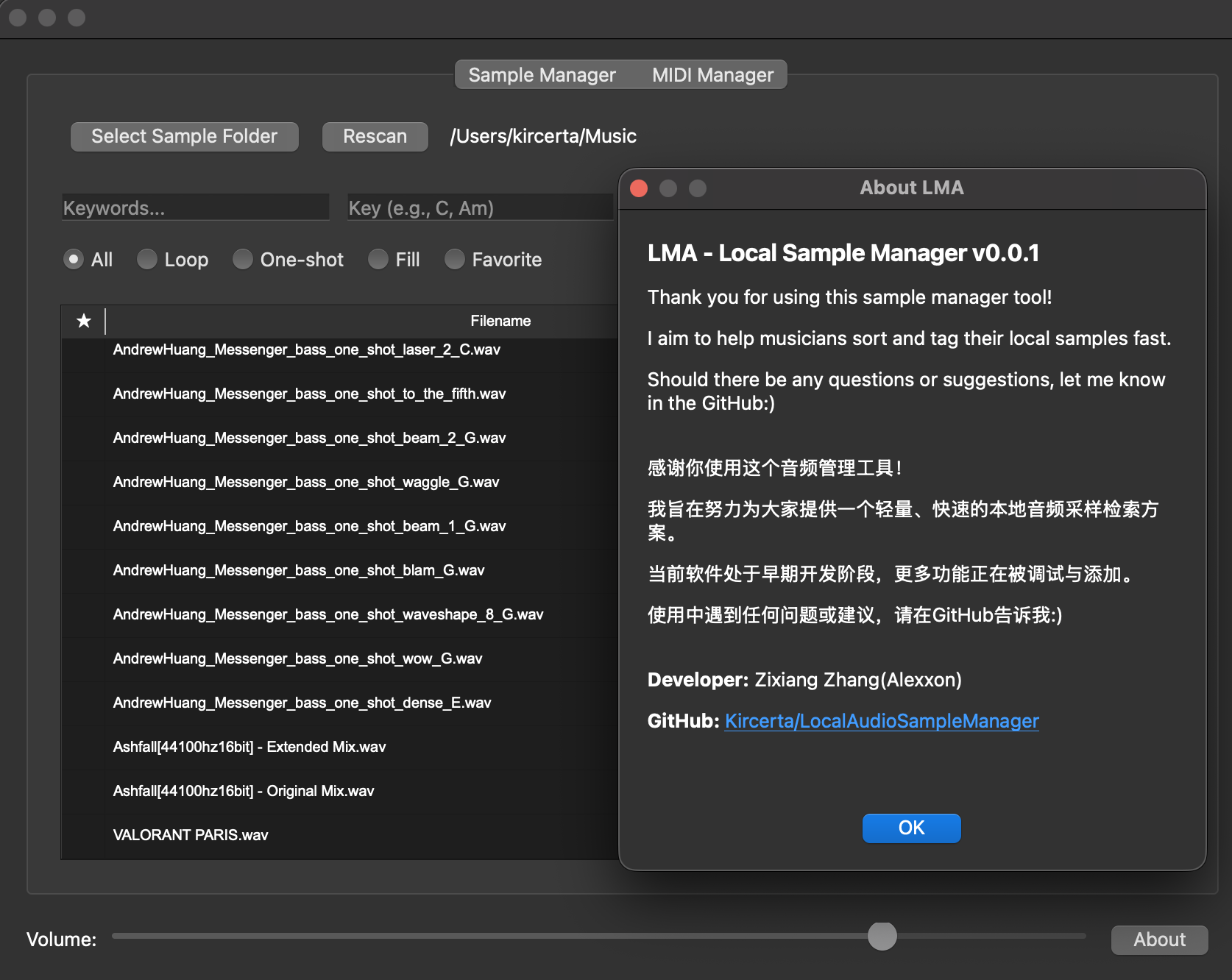
- The
Aboutbutton redirects you to the GitHub project page.
Development Talk
When I was in high school, my school taught the A-Level curriculum. We had to choose three subjects we were interested in to study and test on. I chose Mathematics, Physics, and Computer Science. However, the computer science curriculum back then only covered Visual Basic—a language basically forgotten by modern times. Still, it helped me establish a foundational understanding of data structures, object-oriented programming, and IDEs. It wasn’t deep, but it was my first baby step.
In university, I majored in a combined Mathematics and Statistics program (formally the Mathematics and its Applications in Statistics Specialist). During my freshman year, I wanted to dive deeper into computer science and took a course coded CSC148. That was when I began learning Python syntax and object-oriented programming in Python. Later, when my academic focus shifted entirely to math and stats, I drifted away from programming. Yet, I’ve always maintained an interest in it. I’ve always agreed with Tim Cook that programming skills should be part of basic education in the modern era—a fundamental skill everyone should master.
The rise of generative AI has made programming more accessible than ever before. During LMA’s development, Google’s Gemini 2.5 Pro and OpenAI’s ChatGPT 4.o massively boosted my efficiency. I also discovered incredibly useful libraries, like soundfile, entirely through their recommendations.
So, if you want to learn programming today—at least for building a somewhat complex app like LMA—generative AI can hold your hand every step of the way. It can help you understand functions, build custom search logic, design a usable GUI, and more. The cost and time required to learn are completely different from what they used to be. This was also my first time attempting to contribute something to GitHub.
While AI can guide your knowledge and direction, the actual debugging and overarching architectural design of the program still fall on you. For instance: What exactly do you want the software to do? What should its interaction logic feel like? Where should this button go, and what should it say? If you offload all of this to AI, it will likely build something entirely different from what you envisioned. Only by being crystal clear about your needs—knowing exactly what form the software must take, what functions it must execute, and what problems it must solve—can AI truly act as your copilot, providing tactical knowledge and advice for your strategic moves.
I also want to discuss some troubleshooting hurdles I faced.
First, the file retrieval logic. The naming conventions of some samples left me genuinely speechless. But I also understand that the industry simply lacks a unified naming standard. Here are three dummy examples to illustrate how to approach this:
- File 1:
abcdefg_02_Cmaj_120 - File 2:
hijklmn_BPM111_D_one_shot_119 - File 3:
opqrstu_A_Doriam_70bpm_loop
Ignoring the gibberish placeholders, we can spot their characteristics: File 1 is an audio clip named abcdefg in C major, type unknown (loop or one-shot), containing the number 120, which most likely means 120 BPM. In File 2, the number 111 is clearly preceded by BPM, D indicates the major key (lacking a m modifier), it’s a one-shot, and 119 is likely just an index number. In File 3, it’s an A Dorian loop at 70 BPM. If I try to build a search function for these, what problems arise?
First, my core retrieval logic treats every segment separated by an underscore (_) as a token. This is achieved via:
tokens = re.split(r"[_\s\-]+", name)
So, how do I handle the 120 in File 1? If I simply scan every token for numbers, then when I search for a BPM of 111, File 2 shows up. But what if my tagging logic mistakenly grabs the 119 in File 2 as its BPM? Could I fix this by adding a strict rule: “A token is only recognized as BPM if the number is immediately followed/preceded by the letters ‘bpm’”? That seems viable. But then, how do I handle the 120 in File 1? It would no longer be recognized as BPM, and searching “120 BPM” would yield nothing!
To solve this, handling edge cases via specific conditions is the best approach. A program is not a human brain; its processing logic is strictly linear. Therefore, you must assume linear logic to evaluate content, and then design a foolproof failsafe. Based on this, my token evaluation logic is:
Use a regular expression to match the entire token and check if it’s a 2-3 digit number (10-999), with or without the letters “bpm” adjacent to it (case-insensitive). If it matches and result["bpm"] hasn’t been assigned yet, extract the number (bpm_val).
        bpm_match = re.fullmatch(r"(?:bpm)?(\d{2,3})(?:bpm)?", token, re.IGNORECASE)
        if bpm_match and result["bpm"] is None:
            bpm_val = int(bpm_match.group(1))
Then, we branch into conditional logic:
Case 1: If the token explicitly contains the string “bpm”, trust the number unconditionally.
Case 2: If the token does not contain “bpm” (meaning it’s just a raw number like “120”), only accept it if it falls within a “reasonable BPM range” of 60 to 200.
            if "bpm" in token.lower():
                result["bpm"] = bpm_val

            elif 60 <= bpm_val <= 200:
                result["bpm"] = bpm_val
This logic is vastly more robust than the previous “if it doesn’t say bpm, ignore it” approach, right? But what if a file is named aaaaaa_120_121_122_123_Cmajor_one_shot? How do I determine its BPM? Is it 120? 121?
If you encounter a file like that, LMA simply cannot help you. This is a file specifically designed to give you a headache. Even a human would struggle to guess what it means. This is why my documentation states: “requires manual renaming.” Similarly, if a file is named in pure Chinese characters (e.g., 采样_拍速一百二十), my parsing logic won’t catch it. In such cases, LMA is equally powerless.
Another issue worth mentioning is the crash occurring during file reads. Initially, every time I dragged a file into Ableton or onto the desktop, the app crashed instantly. I deduced that the cache was being cleared before the OS finished the copy operation. The task thread snapped, the program didn’t know what to do next, and it crashed. To fix this, I set the temporary file deletion to trigger 5 seconds after the drag operation. If the deletion fails (e.g., file still in use), the program gracefully ignores it instead of crashing.
        def cleanup_temp_file():
            try:
                if os.path.exists(temp_copy):
                    os.remove(temp_copy)
            except Exception as e:
                print(f"Info: Could not cleanup temp file (likely in use, this is OK): {e}")
        QTimer.singleShot(5000, cleanup_temp_file)
While this edge case is rare (audio files aren’t huge, so 5 seconds is plenty on modern OSs), a failed deletion leaves a junk file behind. I don’t know if Windows/macOS auto-cleans these eventually. If not, I’ll need to build an automated self-cleaning routine to prevent junk accumulation.
Isolating variables during debugging also wasted a ton of my time. After implementing the drag-and-drop fix, the new LMA version started crashing upon initial folder selection. I thought it was a timeout issue caused by the lack of a “loading delay” logic. Later, I realized it was simply because I hadn’t moved LMA into the Applications folder on my test Mac. These bugs manifest in incredibly bizarre ways. IDE debugging only catches internal execution failures; it cannot prepare you for the nightmare of an app running perfectly in your dev environment but instantly crashing in the wild due to OS quirks.
Finally, I must bring up the macOS developer signature issue again. Apple’s security policies genuinely make me feel like they don’t treat users as humans with normal intelligence.
Because my direct build was “uncertified,” sending it from my dev Mac to a test Mac triggered Gatekeeper. In certain cases, Gatekeeper employs a measure far harsher than “Deny Access”—it outright lies to you, stating: “The file is damaged. You should move it to the Trash.” When this happens, macOS won’t even give you the option to manually bypass it in Security & Privacy.
Initially, macOS repeatedly telling me the file was damaged while it ran flawlessly on my dev machine left me deeply confused. I genuinely thought I had botched the packaging process. When I finally realized Gatekeeper was lying to me, I wanted to demand Apple refund all the hours I wasted debugging. If I distribute this to users, they will inevitably assume my software is broken or infected. I received a message from a friend today confirming exactly this, which left me speechless.
Once I force-updated the signature and re-sent the exact same binary, LMA ran perfectly.
Of course, a workaround exists. Open Terminal and type:
xattr -cr <drag the application here>
But I am not designing this software exclusively for power users; my target audience is everyone. I need to minimize friction, so relying on Terminal commands is something I must avoid.
Ultimately, I had to manually generate an entitlements.plist, forcibly overwrite the old signature, and package it into a DMG for users to drag into their Applications folder:
codesign --force --deep --sign - --options runtime --entitlements entitlements.plist "dist/SampleManager.app"

hdiutil create -volname "SampleManager" -srcfolder "dist/SampleManager.app" -ov -format UDZO "dist/SampleManager.dmg"
This new DMG runs perfectly on non-dev systems. As of Oct 29, the client file I uploaded is this DMG. But even then, I can’t guarantee identical issues won’t surface elsewhere. I can only rely on user feedback to make further corrections. If you want to permanently stop macOS from intercepting your software, you essentially have to pay Apple an annual subscription (how is this any different from a protection fee? I’m a law-abiding citizen, man!).
LMA will continue to evolve and iterate. I will keep learning software development to squash current bugs faster and earlier. However, constrained by my free time and current skill level, update frequency will likely slow down. I will keep improving myself to bring more features to LMA: faster load times, superior search logic, metadata reading, waveform previews, and a sleeker GUI.
The development docs and my rants will be updated alongside LMA. There’s still so much worth sharing, and I hope you’ll give me the time to make LMA better and better!